Commercial Security Camera Planning

Which Surveillance System Is Best for a Commercial Property?

The best surveillance system for a commercial property is the one that matches the site’s coverage goals, network policy, storage needs, user workflow, maintenance expectations and budget. IP camera and NVR systems are often strong for managed commercial sites, while cloud-managed, hybrid or specialty systems can fit specific operational needs.

A good choice starts with the property, not the product category: offices, warehouses, retail, yards, healthcare buildings and multi-site businesses all review video differently.

Commercial-First PlanningCamera decisions are matched to property operations, review goals and the people responsible for using the system.
Coverage Before EquipmentThe project starts with what each view must prove, not with a generic camera count.
Infrastructure-Aware DesignPower, cabling, network, storage and mounting constraints are reviewed before installation work begins.
Practical User WorkflowPermissions, remote viewing, alerts and review responsibilities are considered before turnover.
Documented System DeliveryFinal delivery includes testing, camera labeling, user guidance and system documentation so the team can operate and support the system.

SURVEILLANCE SYSTEM SELECTION

Matching Surveillance Systems to Property Operations

The best system decision should compare how each option handles coverage, evidence quality, remote access, ownership of recordings, cybersecurity, serviceability and growth. A system that looks inexpensive can become costly if it is hard to manage or cannot support the property later.

Data Pro Communications helps commercial properties compare surveillance system options by reviewing coverage goals, platform architecture, storage, licensing, user workflow, ownership of recordings and long-term support needs.

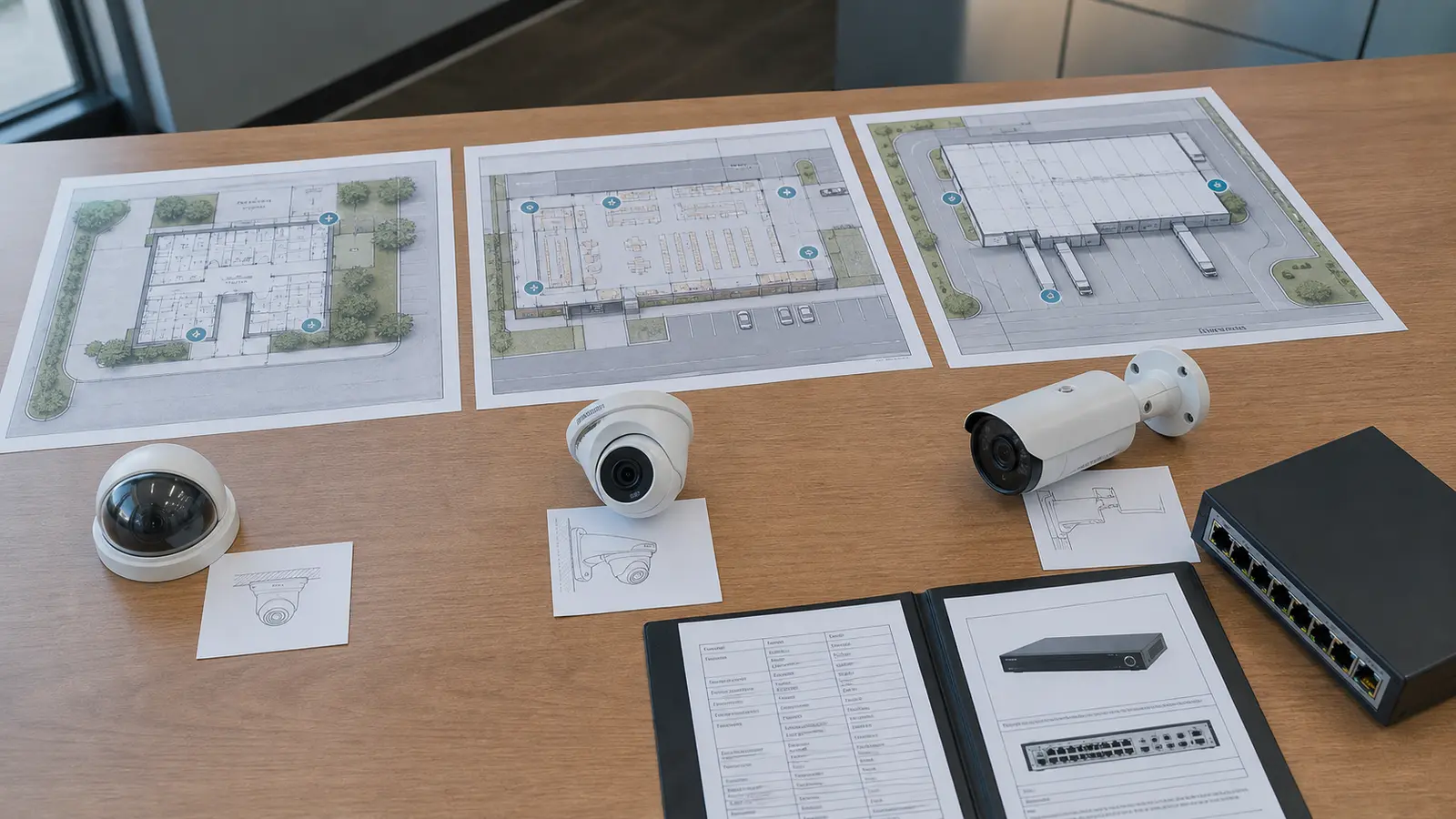
Facility manager comparing practical surveillance layouts for office, retail, and warehouse properties

PLANNING GUIDE

Commercial Surveillance System Comparison Points

Security Objectives and Required Coverage

Map the views that must answer real operational questions before selecting cameras.

IP, Network and Existing-System Compatibility

Confirm power, pathway, network, recording and mounting needs before installation.

Camera Quality, Recording and Retention

Match lens, lighting, resolution and distance to the detail needed after an event.

User Roles, Remote Access and Administration

Plan who can view, export, administer and receive alerts from the system.

System Testing, Documentation and Training

Verify camera names, views, recording, remote access and documentation before launch.

Lifecycle Cost, Support and Expansion

Leave the system organized so additional cameras, analytics or sites can be added cleanly.

Tampa commercial properties may need a mix of interior, exterior, parking, dock and managed-access coverage. The right system can be different for a single office suite than for a multi-building industrial property or a seasonal outdoor operation.

Tampa offices, warehouses and multi-site operations may need different surveillance architectures. A single office may value simple review and user roles, a warehouse may need NVR storage and PoE infrastructure, and a multi-site company may compare cloud, hybrid, licensing, ownership and support workflow before standardizing a platform.

Commercial Surveillance System Selection Detailed Planning Guide

Commercial Surveillance System Selection: What This Guide Covers

This guidance helps commercial buyers compare NVR, cloud-managed, hybrid and specialty surveillance options based on operations, lifecycle cost, user workflow and supportability rather than choosing by camera price alone.

Commercial Surveillance System Selection: How the System Works

Commercial Surveillance System Selection: Core Components

A surveillance system includes cameras, network or cabling, recording or cloud platform, storage policy, user roles, remote access, licensing, cybersecurity settings, support workflow and documentation. NVR, cloud and hybrid systems handle those components differently, so the best choice depends on how the property uses video.

Commercial Surveillance System Selection: Operational Flow

The selection process starts with how the team reviews video, who manages users and how long recordings must be retained. System architecture is then compared against infrastructure, licensing, ownership, support and expansion needs before the platform is selected.

Commercial Surveillance System Selection: Planning Criteria

  • Coverage purposeDefines what the view must prove after an incident.
  • Distance and detailConnects lens, resolution and mounting to usable footage.
  • Lighting and scheduleConfirms daytime, nighttime and after-hours performance.
  • Power and pathwayDetermines whether wired, wireless, solar or temporary infrastructure is realistic.
  • User workflowClarifies who reviews video, exports clips and receives alerts.

Commercial Surveillance System Selection: Commercial Examples

Example: A professional office may prioritize simple review, clean user roles and common-area coverage.

Example: A warehouse may need NVR storage, PoE switching and rugged exterior cameras.

Example: A multi-site business may need standardized remote viewing and documented user administration.

Commercial Surveillance System Selection: Operational Recommendations

Recommendation: Compare systems by workflow, retention, support and expansion needs, not just camera price.

Recommendation: Decide who will review video, how often, from where and under what permissions.

Commercial Surveillance System Selection: Advantages and Limitations

Commercial Surveillance System Selection: Advantages

Advantage: A matched system is easier to operate and support over time.

Advantage: Scalable architecture can reduce disruption when cameras are added later.

Advantage: Documented roles and retention settings reduce confusion after an incident.

Commercial Surveillance System Selection: Limitations

Limitation: No single system type is best for every property.

Limitation: Cloud, NVR, hybrid and specialty systems each have tradeoffs in bandwidth, storage, licensing and control.

Limitation: Existing infrastructure may limit options until it is tested.

Commercial Surveillance System Selection: Common Mistakes

Common mistake: choosing a system only by upfront camera cost

Common mistake: ignoring storage, licensing or bandwidth requirements

Common mistake: selecting consumer equipment for commercial workflows

Common mistake: failing to document admin and user access

Commercial Surveillance System Selection: Infrastructure Dependencies

  • Cabling or communicationsConfirm pathway, distance, labeling and serviceability before installation.
  • PowerVerify PoE, local power, battery, solar or UPS requirements.
  • Network and securityCoordinate IP addressing, VLANs, firewall policy, remote access and user roles with IT.
  • StorageMatch retention, resolution, frame rate and recording behavior to the review goal.
  • Mounting and environmentConfirm height, weather exposure, tamper risk and maintenance access.

Commercial Surveillance System Selection: Decision Checklist

[ ] Identify who reviews video, who manages users and how often footage is needed.

[ ] Compare NVR, cloud and hybrid architecture against storage, bandwidth and ownership needs.

[ ] Review licensing, remote access, cybersecurity, support and expansion requirements.

[ ] Validate cabling, PoE, network and internet capacity before selecting the platform.

[ ] Document the selected platform, user roles, retention settings and support workflow.

[ ] Confirm next action, schedule needs and responsible reviewers before project kickoff.

Commercial Surveillance System Selection: When to Request a Site Review

Request a site review when a property is comparing NVR, cloud, hybrid or multi-site surveillance systems and needs to evaluate storage, licensing, ownership, remote access, user workflow, infrastructure and long-term support.
PROCESS

Commercial Surveillance System Selection Project Process

Identify the video review workflow, users, retention needs and property growth plans

The selection starts with who reviews video, how long it is retained, where users work, and how the property may expand.

Compare NVR, cloud, hybrid and specialty architectures against those requirements

NVR, cloud-managed, hybrid, and specialty options are compared against storage, bandwidth, control, licensing, and operating workflow.

Validate infrastructure, licensing, lifecycle cost, ownership and support workflow

Existing cabling, PoE, internet capacity, cybersecurity policy, recurring costs, recording ownership, and support responsibilities are validated.

Select the platform, document user roles and plan future expansion

The chosen architecture is documented with user roles, retention settings, administration records, and a practical expansion path.

FAQ

Commercial Surveillance System Selection FAQs

Which surveillance system is best for a business?

The best system is the one that matches the site, coverage goals, storage needs, user workflow, network policy and support expectations.

Are IP cameras better than analog CCTV?

IP cameras often offer better scalability and network features, but existing infrastructure, budget and review needs should guide the decision.

Is cloud video better than an NVR?

Cloud systems can simplify remote access, while NVR systems can offer local storage and control. Many commercial projects compare both tradeoffs.

What should be compared before choosing?

Compare coverage, retention, bandwidth, licensing, cybersecurity, user roles, serviceability and expansion needs.

Can one system cover multiple sites?

Yes, but multi-site viewing requires consistent user management, network planning and standardized camera naming.

What system is best for warehouses?

Warehouses often benefit from IP cameras, PoE switching, NVR or VMS storage and targeted views at docks, aisles and yards.

What system is best for offices?

Offices often need clean access roles, common-area coverage, entrance views and simple review workflows.

Should price decide the system?

Price matters, but the lowest upfront equipment cost may not be best if storage, licensing, support or expansion are weak.

Can existing cameras be reused?

Sometimes. Existing cameras, cabling and recorders should be tested for quality, compatibility and supportability.

When should a site review be requested to compare commercial surveillance systems?

Request a site review when comparing NVR, cloud, hybrid or specialty options and when the property has multiple coverage needs.

NEXT STEP

Choose the Right Surveillance System for Your Property

If the property needs practical camera planning, site-specific infrastructure review or a clear path from question to implementation, request a commercial site survey.

Request a Site Survey